Inquiry and online search
Every rental starts with the same question: is a vehicle of this class free at this branch between these dates? Torque answers it the same way for a customer on the website and for an agent on the phone.
How availability works
Section titled “How availability works”Torque does not look for a free car. It counts how many vehicles of a class the branch owns and how many are already promised for any moment in the requested period. If at least one is left over for the whole period, the class is available. Which specific car the customer will get is decided later, often only on the day of pickup.
Two things sit around every rental in that count:
- A lead time before pickup, e.g. to prepare and clean the vehicle, and a lag time after return, to allow for buffer time for late returns and vehicle check-in. Both default from the branch and can be overridden on a booking. For long-term bookings which only extend week by week, you may want to choose a longer lag time of e.g. 10 days to avoid promising a vehicle before the current holder has decided on their extension.
- The branch’s opening hours. A pickup or return outside opening hours is not offered. The website suggests the nearest open time instead.
Phone and email inquiries
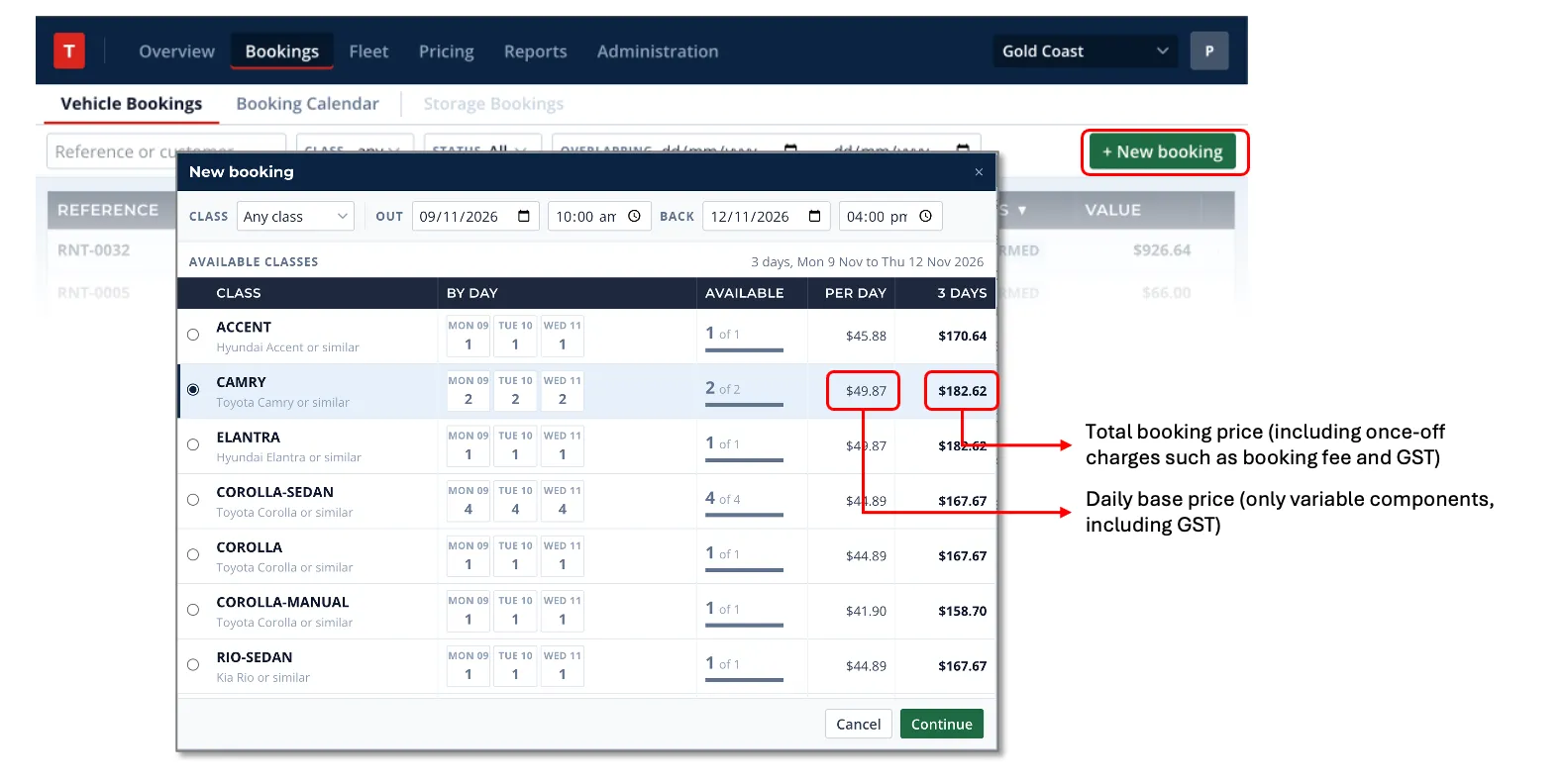
Section titled “Phone and email inquiries”An agent checks availability from the New booking dialog in the console.
- Open Bookings and click New booking.
- Choose the Branch, then Out date and time and Back date and time.
- The dialog lists every class with a price per day, the total (including booking fees).
- Quote the customer. Nothing is reserved yet. Close the dialog if the customer only wants a price.
A quote given over the phone does not hold a vehicle. If the customer wants the car, continue to a booking (chapter 2). If they want to think about it, create a Draft booking so the quote is kept, but tell the customer the vehicle is not reserved until they confirm.
Online search
Section titled “Online search”On the website the customer picks a branch, pickup and return dates and times, and sees the same list of available classes with prices. Nothing is held while they browse or fill in their details. The quoted offer stays valid for 30 minutes. When the customer pays, Torque checks availability again, holds a vehicle for the two minutes it takes to capture the money, and confirms the booking. If another customer paid for the last vehicle first, the payment is released and the customer is told the class is no longer available.
What a reservation is
Section titled “What a reservation is”A reservation is one vehicle of the booked class kept free for the booked period plus its lead and lag time. It is what stops the same car being promised twice. A reservation goes through its own states, separate from the booking:
| Reservation state | Meaning |
|---|---|
| HELD | Kept free briefly before confirmation: 30 minutes for a Draft an agent creates in the console, about two minutes while an online payment is captured. Expires if the booking is not confirmed |
| PLANNED | Confirmed and waiting for pickup. A vehicle may already be pencilled in, but it can still be swapped for another of the same class |
| ACTIVE | The vehicle is with the customer |
| COMPLETED | Returned. The slot stays blocked so history is never overwritten |
| CANCELLED | Released. The vehicle is free for someone else |
A hold that has expired still blocks the class until Torque sweeps it, which happens every minute and at the start of every new booking for that class. An agent never needs to clean up expired holds by hand.
A website checkout that was started but never paid leaves a Draft with no reservation. It is cancelled automatically after 60 minutes. A Draft the agent created in the console is never swept: it stays until the agent confirms or cancels it.